Monday, 10 June 2013

FreeCommander - File Management (Freeware)

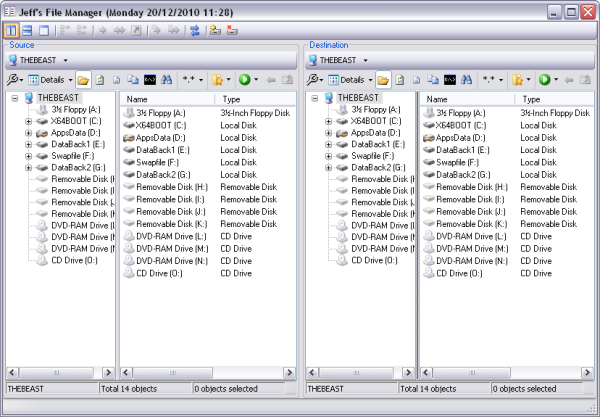
Dual-Panel File ExplorerFreeCommander is a dual-panel file explorer with many additional features. In addition to the standard file management features, it can be used to compare directories, display folder sizes, synchronize folders and more. The program can also open/create ZIP and CAB files, and open RAR files, as well as search inside those archives.You can also set view filters, create folder list (for printing), change file attributes, launch a command prompt, take a desktop screenshot and more.

Download here


Eusing Free Registry Cleaner - Registry Tools (Free ware)

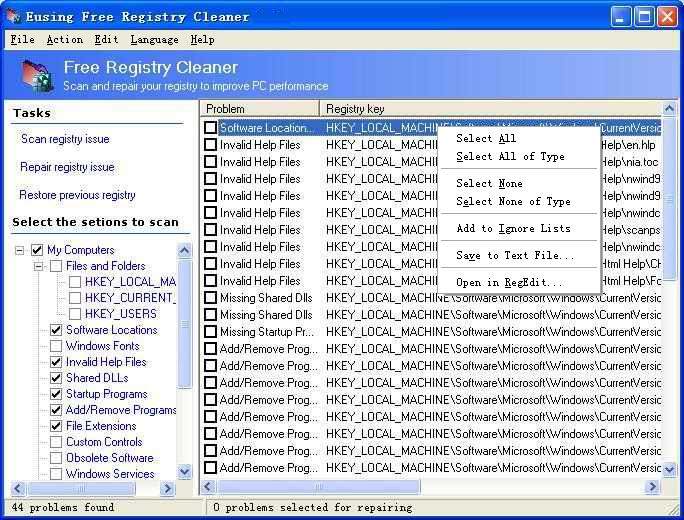
Remove Invalid Registry EntriesEusing Free Registry Cleaner enables you to scan your registry for invalid entries. It provides a list of all errors that were found, and you can choose to remove all items, or only selected errors.Before the program deletes any keys, it automatically creates a backup of the registry and allows you to easily undo any changes if needed.You can choose to scan the entire registry or only selected sections.

Download here


TrueCrypt - Encryption Tools (Freeware)

Real-Time File EncryptionTrueCrypt is an open-source encryption software that enables you to create a virtual encrypted disk within a file and mount it as a virtual drive, that can be accessed via a drive letter. Any file that is stored on this virtual drive is automatically encrypted on-the-fly, and can only be accessed while the drive is mounted with the correct password or key.TrueCrypt supports a variety of encryption algorithms, including AES-256, Blowfish (448-bit key), CAST5, Serpent, Triple DES, and Twofish. Other features include support for FAT32 or NTFS formatting, hidden volumes, hotkeys for mounting/dismounting and more.TrueCrypt can be installed on a portable drive unless you want to encrypt your system partitions.

Download here


PhotoFiltre - Image And Photo Editing (Freeware)

Photo Editing And EffectsPhotoFiltre is a complete image editing and effects package, that will not only surprise you with features but also with the fact that it is free (for personal use). It comes with many features that rival some commercial packages, as well as additional add-on that can be downloaded from the web site.PhotoFiltre offers all the standard editing features (selection, clone brush, paint brush etc.) as well as a large selection of image effects, photo masks, image adjustments, thumbnail browser and much more. The program also supports batch processing to apply filters, sizing, adjustments and transformations to a large number of images at once.Photo Filtre 7 now supports layers and transparency with Alpha Channel.

Download here


Thursday, 6 June 2013

PowerISO 5.1 Portable (Multilang)

PowerISO 5.1 Portable (Multilang)

PowerISO is a powerful CD / DVD / BD image file processing tool, which allows you to open, extract, burn, create, edit, compress, encrypt, split and convert ISO files, and mount ISO files with internal virtual drive. It can process almost all CD / DVD / BD image files including ISO and BIN files. PowerISO provides an all-in-one solution. You can do every thing with your ISO files and disc image files.

SUPPORT ALL CD/DVD/BD IMAGE FILES...
CREATE, EXTRACT, BURN, MOUNT IMAGE FILES...
SUPPORT BOTH 32 BIT AND 64 BIT WINDOWS...
SUPPORT WINDOWS 7, VISTA, XP...


Main Features
  • Support almost all CD / DVD / BD-ROM image file formats (ISO, BIN, NRG, CDI, DAA and so on).
    What is DAA file? DAA file (Direct-Access-Archive) is an advanced format for image file, which supports some advanced features, such as compression, password protection, and splitting to multiple volumes.
  • Open and extract ISO file. You can extract ISO file with a single click.
  • Burn ISO file to CD, DVD, or Blu-Ray disc. PowerISO is a professional burning software. With this tool, you can create Audio CD, Data CD, Data DVD, Video DVD or VCD. PowerISO also supports Blu-Ray burning.
  • Burn Audio CD from MP3, FLAC, APE, WMA, or BIN files.
  • Rip Audio CD to MP3, FLAC, APE, WMA, or BIN files.
  • Create ISO file or BIN file from hard disk files or CD / DVD / BD discs. 
  • Edit ISO image file directly.
  • Mount ISO file with internal virtual drive. PowerISO can mount all popular disc image files to built-in virtual drive.
  • Convert image files between ISO / BIN and other formats. PowerISO can not only convert BIN to ISO, but also convert almost all image file formats to standard ISO image file.
  • Create bootable USB drive. PowerISO allows you to setup Windows through USB drive.
  • Make bootable ISO file and create bootable CD, DVD disc.
  • Support both 32-bit and 64-bit Windows.
  • Can be used easily. PowerISO supports shell integration, context menu, drag and drop, clipboard copy paste...
37 languages included!

Tuesday, 4 June 2013

NCT-2000XP “win32k.sys” 多用户错误 不兼容

“win32k.sys” 多用户错误

“USER32.DLL 和 WIN32K.SYS 文件不兼容”信息对话框提示,为什么?


【 场景一 】 我对装有 NCT-2000-XP 主计算机的 Windows 系统进行周期性维护和补丁升级(见注释1),  可是当我完成上述操作后,却发现每次启动主计算机时,系统会出现:“USER32.DLL 和WIN32K.SYS 文件不兼容”提示窗口,但不影响 SPEED-网络共享器终端机设备正常使用,这是为什么?另外如何取消上述窗口的出现?  解答:导致上述问题的发生,是因为 Microsoft 发布的 Windows OS 系统补丁程序中有个补丁组件和 NCT-2000-XP 使用的文件有部分冲突,但不影响  SPEED-3100B,SPEED-5100B等终端设备的使用。  为了获得最新服务,建议用户经常对 NCT-2000-XP 服务软件进行升级(见注释2)。

如何解决上面的问题:


第一种:升级 NCT-2000-XP 最新服务软件  此时需注意升级后,可能出现SPEED共享器连接不上终端服务器的现象,不推荐此方法 


第二种:卸载指定的 Windows OS 系统补丁程序, 具体步骤:

第1步)卸装 “windows update file  (KB890859;KB958690;kb925902,KB956572,KB941693 KB954211 KB956803 KB956841  其中KB956572,KB958690这个补丁是目前造成现在共享器无法连接出错的罪魁祸首,这个补丁暂时不能打)”  

第2步)具体操作:开始 -> 设置 -> 控制面板 ->显示更新-> 添加和删除程序中 第3步)然后重启 windows, 就 OK 拉.  

第3步),如果无法找到上述补丁,建议使用SP2的Windows XP光盘进行全新安装,并不再更新所述补丁.


注释:
注释1:Windows 补丁升级: Microsoft 会经常对其开发的 Windows 系统修补,并推出补丁程序。
注释2:NCT-2000-XP 补丁升级:nComputing 会定期和不定期地对其开发的 NCT-2000-XP 服务软件进行改善,以便提高服务软件的功能,所以建议用户经常对 NCT- 2000-XP 升级

Monday, 3 June 2013

HD audio & MS UAA won't install on Windows XP SP3 / The way convert windows xp sp3 to sp2

MS UAA is required for Realtek HD audio to work (and I expect on any other HD audio).

The fix is you have to tell your rig it's SP2, then install UAA, then the HD audio will work. 

here's the reg key:

HKLM\SYSTEM\CurrentControlSet\Control\Windows\CSDVersion 

you have to change the dword value

values for XP SP's:

hex 100 = SP1

hex 200 = SP2

hex 300 = SP3

when done you change back to hex 300 and restart

screen shot: